
Zen Tickets
 Brad Copp
 1 / 2
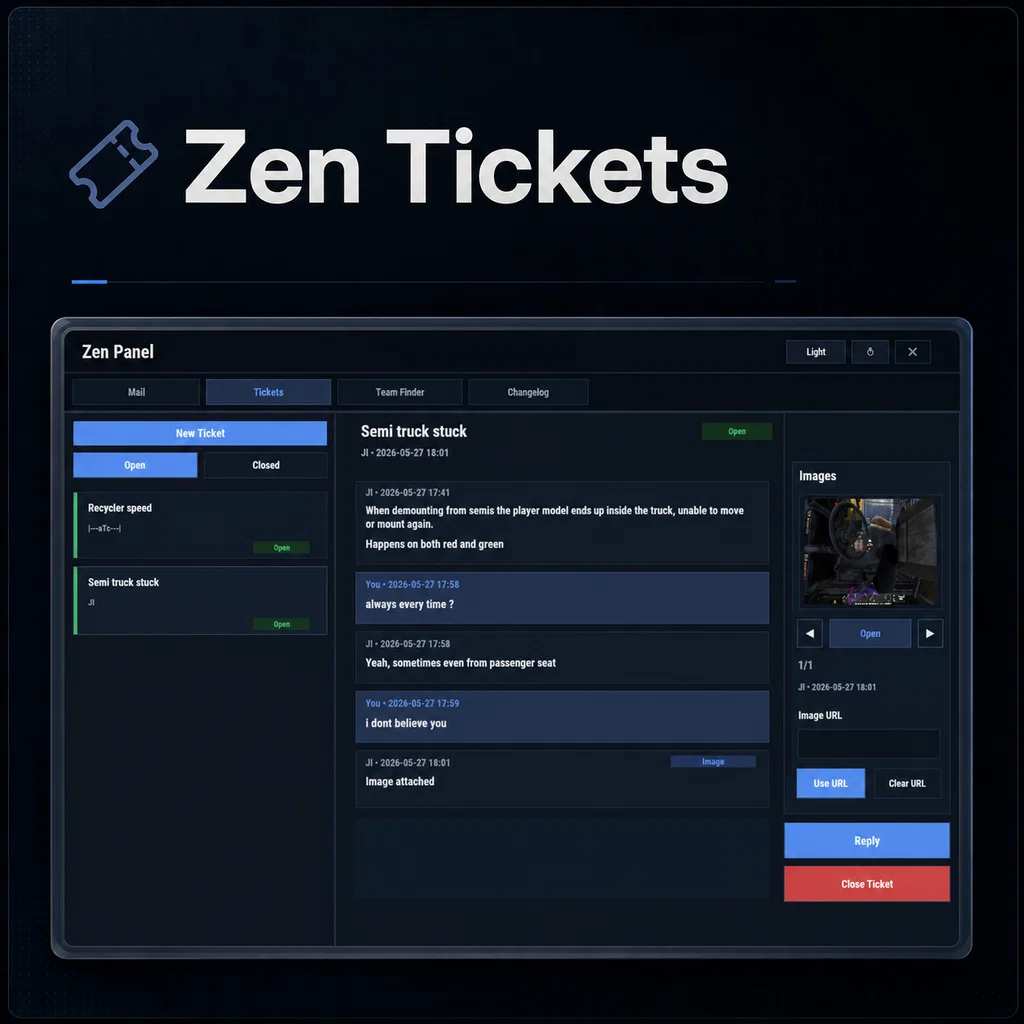
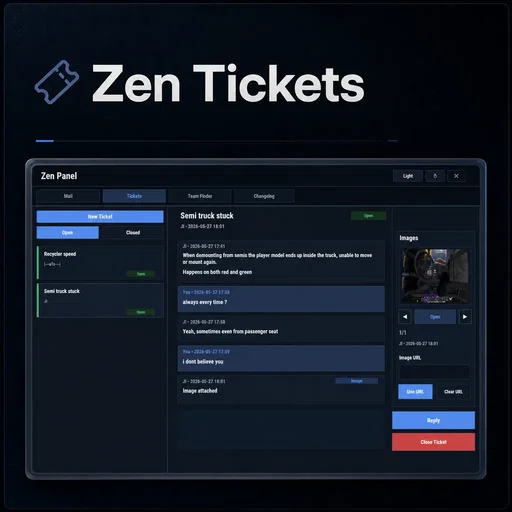
Zen Tickets is an in-game support ticket system for Rust servers, designed as a Zen Panel addon that gives players a clean, simple way to contact staff without relying on chat spam, Discord pings, or messages getting lost during busy wipes.
Players can create tickets directly from the in-game UI, including a subject, message content, and optional image URL attachments. Staff members can view and respond to all tickets, while players only see their own. Replies are appended to the original ticket, creating a full conversation thread that can be followed from start to finish.
Designed for support requests, player reports, bug reports, compensation requests, staff communication, appeals, and general server help, Zen Tickets gives your server a persistent and easy-to-use support system that players can access at any time through Zen Panel.
Perfect For
- Player support requests
- Bug reports
- Rule break reports
- Compensation requests
- Ban/mute appeals
- Donation or reward issues
- Event support
- General admin-to-player communication
- Keeping staff replies organized in one place
Core Features
Persistent ticket system
- Tickets are saved and remain available until cleared
- Each ticket stores its creator, subject, status, timestamps, and full message history
- Players can only view their own tickets
- Staff can view all player tickets
- Unread tracking is stored per player/staff member
- Optional wipe-based ticket clearing
Zen Panel integration
- Runs as a Tickets tab inside Zen Panel
- Uses the Zen Panel theme/palette system
- Refreshes Zen Panel HUD unread indicators
- Uses Zen Panel popups where available
- Clean, scrollable, modern ticket UI
Simple ticket creation
- Players can create new tickets from the Tickets tab
- Subject and content fields are included
- Configurable subject and body length limits
- Ticket content may be text, an image URL, or both
- Input validation prevents empty tickets
- Clean create/discard flow
Threaded conversations
- Replies are appended to the original ticket
- Full back-and-forth conversation history is shown in order
- Messages display sender and timestamp information
- Staff replies are visually highlighted
- Conversation list scrolls cleanly for longer tickets
##
Ticket status system
- Tickets can be Open or Closed
- Open and Closed tickets can be viewed separately
- Tickets can be closed once resolved
- Tickets can be reopened if more follow-up is needed
- System messages are added when tickets are closed or reopened
Unread notifications
- Unread ticket tracking per player
- Unread count support through Zen Panel
- Unread chip shown in the ticket list
- Online staff receive chat and sound/FX notifications when a new ticket is created
- Ticket creators and staff receive update notifications when replies, closes, or reopens occur
Image Support
- Players can attach image URLs to new tickets or replies
- Supports direct http/https image links ending in:
.jpg
.jpeg
.png
- Attached images are shown in the ticket image panel
- Tickets can contain multiple image attachments across the conversation
- Image preview is available before submitting a reply
- Users can cycle through attached ticket images
- Images can be opened in a larger image viewer
Staff Tools
- Staff can view all tickets
- Staff can reply to any ticket
- Staff can close or reopen tickets
- Staff receive notifications when players create new tickets
- Staff can track unread updates across all visible tickets
Player Tools
- Players can create support tickets
- Players can reply to their own tickets
- Players can attach image URLs
- Players can close their own tickets
- Players can reopen tickets when needed
- Players can view their own open and closed ticket history
Customization/Config
- Enable or disable the ticket system
- Configure chat commands used to open the Tickets tab
- Default command: /tickets
- Configure whether tickets are cleared on wipe
- Configure maximum ticket subject length
- Configure maximum ticket body length
Chat Commands:
/tickets - Opens the Zen Panel Tickets tab
The open command is configurable, so server owners can add or change the command used to access the ticket UI.
Permissions:
zentickets.open - Allows players to access and use the ticket system
zentickets.staff - Allows staff to view and respond to player tickets
zentickets.manage - Allowd delete etc
Recommended Permission Setup
Players:
zentickets.open
Moderators / Staff:
zentickets.open
zentickets.staff
Admins / Managers:
zentickets.open
zentickets.staff
zentickets.manage
Why Use Zen Tickets?
Zen Tickets gives players a familiar support-ticket experience directly inside the game, without having to search for discord channels or relying on chat messages that disappear, or players needing to wait for an admin to be online, tickets keep support requests organized and easy to follow.
For server owners, it provides a clean in-game workflow for handling reports, issues, and player questions. For players, it gives them a simple place to ask for help and follow staff replies.
If you’re looking for an in-game support system that works naturally alongside Zen Panel, Zen Tickets provides a clean, persistent, and user-friendly solution for both players and staff.
I have done my best to document the full functionality, but if there is any doubt, do not hesitate to open a support request.
Discord notifications
Enable Discord Webhook in the config and add your webhook URL. Optionally add role IDs. New tickets send the player, subject and a message preview of up to 128 characters. Replies do not trigger this webhook.
Requirements
Requires Zen Panel. Oxide servers also need the latest Carbon Aliases extension. Carbon servers do not need that extension.
ZenTickets.json
{
  "Enabled": true,
  "Commands to open the Tickets tab": [
    "tickets"
  ],
  "Clear Tickets On Wipe": false,
  "Ticket Subject Max Length": 100,
  "Ticket Body Max Length": 4096,
  "Discord Webhook": {
    "Enabled": false,
    "Webhook URL": "",
    "Mention Roles (List ID)": []
  }
}

Trusted hosting partner. Affordable game servers with solid support and panels.
Visit site ↗