Rage Cheating Detection
 CalvinRF
 1 / 2
1 / 2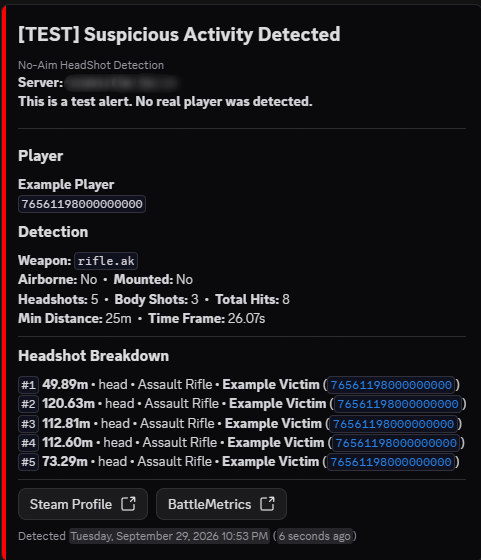
Rage Cheating Detection
Catches rage cheaters hitting long range headshots without aiming and sends the details straight to your Discord.
How It Works
When a player hits a headshot past your distance threshold without aiming, the plugin starts a timer for that weapon. Every hit they land after that gets recorded, including headshots, body shots, distances, victims and hit bones.
If they reach the headshot threshold before the timer runs out, they get flagged and an alert is sent to your Discord webhook. If they don't, all of their data is deleted as soon as the timer ends so nothing old is kept around.
Players aren't tracked at all until they land a headshot without aiming, and their data is cleared when they leave the server. NPCs like scientists and bots from other plugins are ignored, so only real players get tracked.
Discord Alerts
Webhooks are built in, so you don't need DiscordMessages or any other plugin anymore.
Alerts use Discord's new message layout and show the server name, player, weapon, whether they were airborne or mounted, headshot and body shot counts, the time frame, and a breakdown of every headshot with the distance, bone, weapon and victim. There are also buttons that open the player's Steam profile and BattleMetrics page.
You can ping a staff role on every alert. Only that role can be pinged, so a player named @everyone can't ping your whole server. If Discord rate limits the webhook the alert waits and sends after, so you won't lose any.
You can also set a custom webhook name and alert color in the config.
Commands
All commands work from the server console, RCON, or the F1 console as an admin.
| 1 | noaimheadshot status |
| 2 | noaimheadshot reload |
| 3 | noaimheadshot tracked [steamid/name] |
| 4 | noaimheadshot reset <steamid/name/all> |
| 5 | noaimheadshot exclude add <steamid> |
| 6 | noaimheadshot exclude remove <steamid> |
| 7 | noaimheadshot exclude list |
| 8 | noaimheadshot testwebhook |
status shows the plugin status, webhook status and your thresholds.
reload reloads the config.
tracked shows who is being tracked and how long their timer has left. Put in a player to see every headshot they've hit.
reset clears tracking data for one player or everyone.
exclude adds or removes a player from detection, or lists everyone who is excluded. Changes save to the config.
testwebhook sends a test alert to Discord so you can see what it looks like. Test alerts never ping your role.
Config
| 1 | { |
| 2 | "DefaultWeaponSettings": { |
| 3 | "HeadshotThreshold": 5, |
| 4 | "DistanceThreshold": 25.0, |
| 5 | "TrackDuration": 60 |
| 6 | }, |
| 7 | "DiscordWebhookURL": "", |
| 8 | "WebhookUsername (blank = use webhook's own name)": "", |
| 9 | "EnableLogging": true, |
| 10 | "EmbedColor (decimal)": 16711680, |
| 11 | "EmbedPingRoleID": "", |
| 12 | "ExcludedWeapons": [ |
| 13 | "shotgun.double", |
| 14 | "blunderbuss", |
| 15 | "shotgun.m4", |
| 16 | "shotgun.pump", |
| 17 | "shotgun.spas12", |
| 18 | "shotgun.waterpipe", |
| 19 | "krieg.shotgun", |
| 20 | "rocket.launcher.dragon", |
| 21 | "rocket.launcher", |
| 22 | "homingmissile.launcher", |
| 23 | "rocket.launcher.rpg7", |
| 24 | "multiplegrenadelauncher" |
| 25 | ], |
| 26 | "ExcludedPlayers": [] |
| 27 | } |
HeadshotThreshold is how many headshots without aiming it takes to flag a player.
DistanceThreshold is the minimum distance in meters for a headshot to count.
TrackDuration is how many seconds the timer lasts after the first headshot.
EmbedColor (decimal) is the color of the bar on the side of the alert. 16711680 is red.
EmbedPingRoleID is the ID of the role to ping on alerts. Leave it blank for no ping.
Support
Discord: Calvin.1
NoAimHeadShotDetection.json
{
  "DefaultWeaponSettings": {
    "HeadshotThreshold": 5,
    "DistanceThreshold": 25.0,
    "TrackDuration": 60
  },
  "DiscordWebhookURL": "",
  "WebhookUsername (blank = use webhook's own name)": "",
  "EnableLogging": true,
  "EmbedColor (decimal)": 16711680,
  "EmbedPingRoleID": "",
  "ExcludedWeapons": [
    "shotgun.double",
    "blunderbuss",
    "shotgun.m4",
    "shotgun.pump",
    "shotgun.spas12",
    "shotgun.waterpipe",
    "krieg.shotgun",
    "rocket.launcher.dragon",
    "rocket.launcher",
    "homingmissile.launcher",
    "rocket.launcher.rpg7",
    "multiplegrenadelauncher"
  ],
  "ExcludedPlayers": []
}
Command your Rust server. Live WebRCON console, performance and player monitoring, quick actions, groups and permissions, and plugin management.
Visit site ↗