
Admin Robot
 Razor
Razor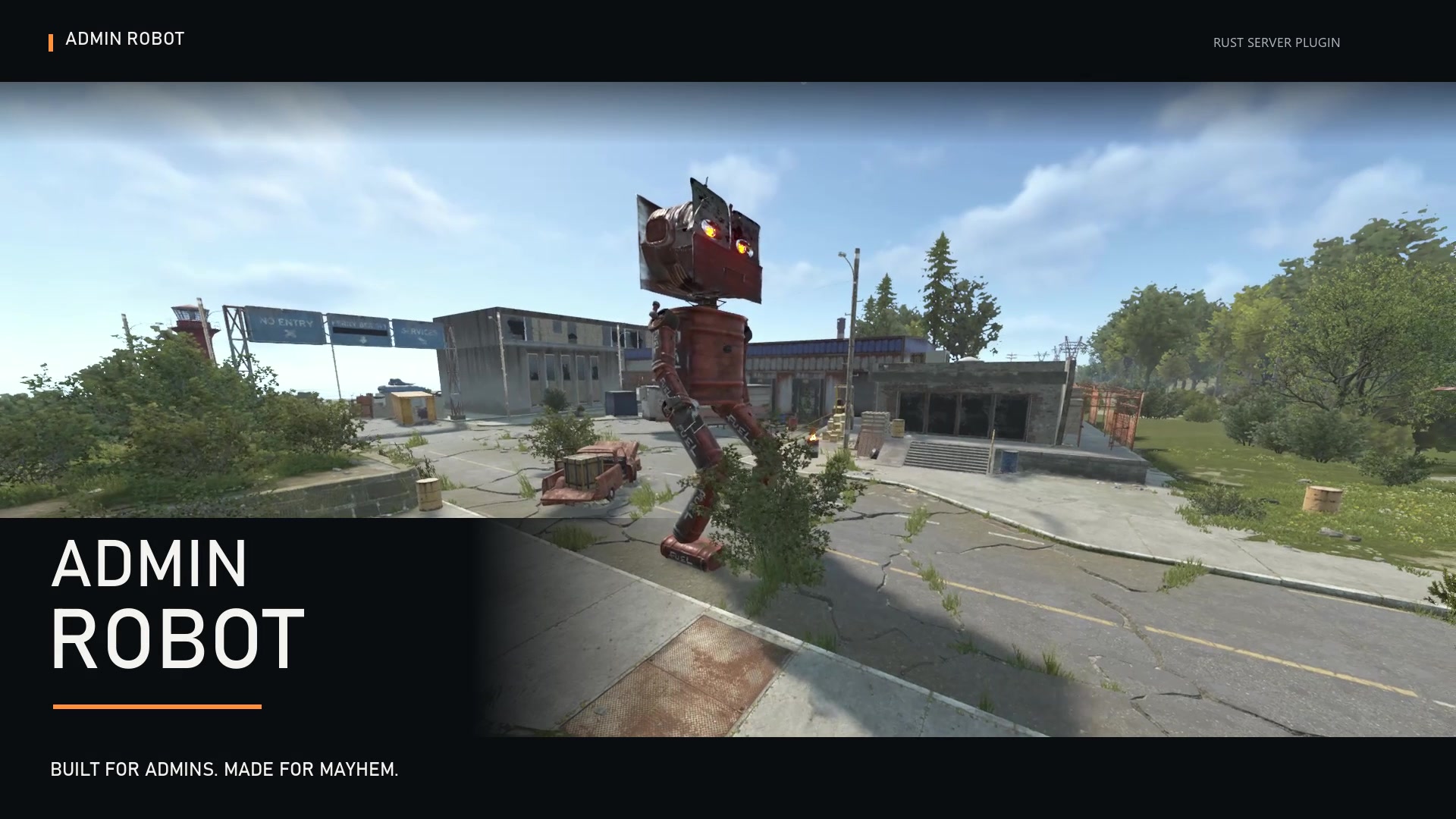
AdminRobot
Put your admins behind the controls of a towering, fully animated robot built from Rust’s vehicle wreckage.
Walk across the map, sprint into action, crouch, and launch into a rocket-assisted jump. Cycle between three rocket types and a tractor beam, unleash mortar barrages, or pick up players and vehicles.
Features
Pilot-controlled movement
- Animated legs, feet, arms, and head.
- Forward and reverse movement, turning, and sprinting.
- Crouching and braking.
- Rocket-assisted jumps with a charging crouch, takeoff effects, and landing.
- Enter through the mount inside the robot’s left foot.
- On-screen display showing health, selected weapon, and weapon readiness.
Weapons and tractor beam
- Three rocket types: cycle between HV, basic, and incendiary rockets.
- Single-click firing: click to begin a rocket shot, or hold to repeat.
- Mortar barrages: launch a spread of shells with configurable shell count and firing interval.
- Tractor beam: grab players, NPCs, modular cars, minicopters, and scrap transport helicopters.
- Hold the beam to carry your target, then release it to drop them.
- Rockets are attributed to the pilot.
Homing missile defense
- Configurable homing missile targetability.
- Automatic flare countermeasures against incoming homing missiles.
- Configurable flare cooldown, defaulting to 30 seconds.
- Custom countermeasure voice playback when flares deploy.
Health and destruction
- One shared health pool for the entire robot.
- Configurable maximum health.
- Optional indestructible mode.
- Configurable protection against combat damage types.
- Harvestable wreckage when destroyed, retaining Rust’s hot debris behavior.
- Automatic cleanup after the robot remains unoccupied for a configurable duration.
Sound effects
- Custom footstep audio played from each foot as it lands.
- Bear trap footstep fallback when the custom step recording is missing.
- Custom damage audio played from the head, with a 10-second cooldown.
- Separate head audio for countermeasure announcements.
Sound recordings are stored in:
oxide/data/AdminRobot/Sounds/
Intro sequence
Use the built-in demonstration command to make the robot walk, perform a rocket jump, fire three harmless demonstration rockets, and display its laser.
Mounting the robot during the sequence cancels the demonstration and gives you control.
Commands
Server administrators and players with adminrobot.admin can use these commands:
| Command | Description |
|---|---|
| /adminrobot | Displays commands and entry instructions. |
| /adminrobot spawn | Builds a robot ahead of you on suitable open ground. |
| /adminrobot test | Builds a robot and starts its demonstration sequence. |
| /adminrobot remove | Removes your current robot, or the nearest robot when you are not piloting one. |
Pilot Controls
| Control | Action |
|---|---|
| W / S | Move forward or backward. |
| A / D | Turn left or right. |
| Sprint | Move faster. |
| Crouch | Crouch and brake. |
| Sprint + Crouch, then release Crouch | Launch a rocket-assisted jump while continuing to hold Sprint. |
| R | Cycle HV rockets, basic rockets, incendiary rockets, and the tractor beam. |
| Left Click | Fire a rocket. Hold to repeat. |
| Hold Left Click in tractor mode | Grab and carry a player or supported vehicle. |
| Release Left Click in tractor mode | Drop the captured target. |
| Right Click | Launch a mortar barrage. |
| Space | Exit the robot. |
Permissions
adminrobot.admin- access to spawning, demonstration, and removal commands.adminrobot.use- permission to enter and pilot a robot.- Server administrators can use commands and pilot robots without either permission.
To grant a player both permissions:
| 1 | oxide.grant user STEAMID adminrobot.admin |
| 2 | oxide.grant user STEAMID adminrobot.use |
To allow a group to pilot robots:
| 1 | oxide.grant group GROUPNAME adminrobot.use |
Configuration
Configure movement network update frequency, rocket cooldown, mortar shell count and spacing, unoccupied despawn time, shared health, damage protection, indestructible mode, homing missile targetability, and flare defense.
AdminRobot is manually piloted. It does not patrol routes or autonomously hunt players.
AdminRobot.json
{
  "Movement network updates per second (5-60)": 20,
  "Rocket firing cooldown (seconds)": 2.0,
  "Mortar shells per barrage": 12,
  "Delay between mortar shells (seconds)": 0.2,
  "Unoccupied despawn time (seconds)": 120.0,
  "Indestructible": true,
  "Can be targeted by homing missiles": true,
  "Homing missile flare defense enabled": true,
  "Flare defense cooldown (seconds)": 30.0,
  "Shared robot health": 500.0,
  "Protection by damage type (0 = no protection, 1 = immune)": {
    "Generic": 0.0,
    "Heat": 1.0,
    "Bullet": 0.9,
    "Slash": 1.0,
    "Blunt": 1.0,
    "Bite": 1.0,
    "Stab": 1.0,
    "Explosion": 0.5,
    "ElectricShock": 1.0,
    "Arrow": 0.75,
    "AntiVehicle": 0.86,
    "Cannon": 0.75
  },
  "Version": {
    "Major": 1,
    "Minor": 4,
    "Patch": 5
  }
}

Trusted hosting partner. Affordable game servers with solid support and panels.
Visit site ↗