OverWatch HUD UI
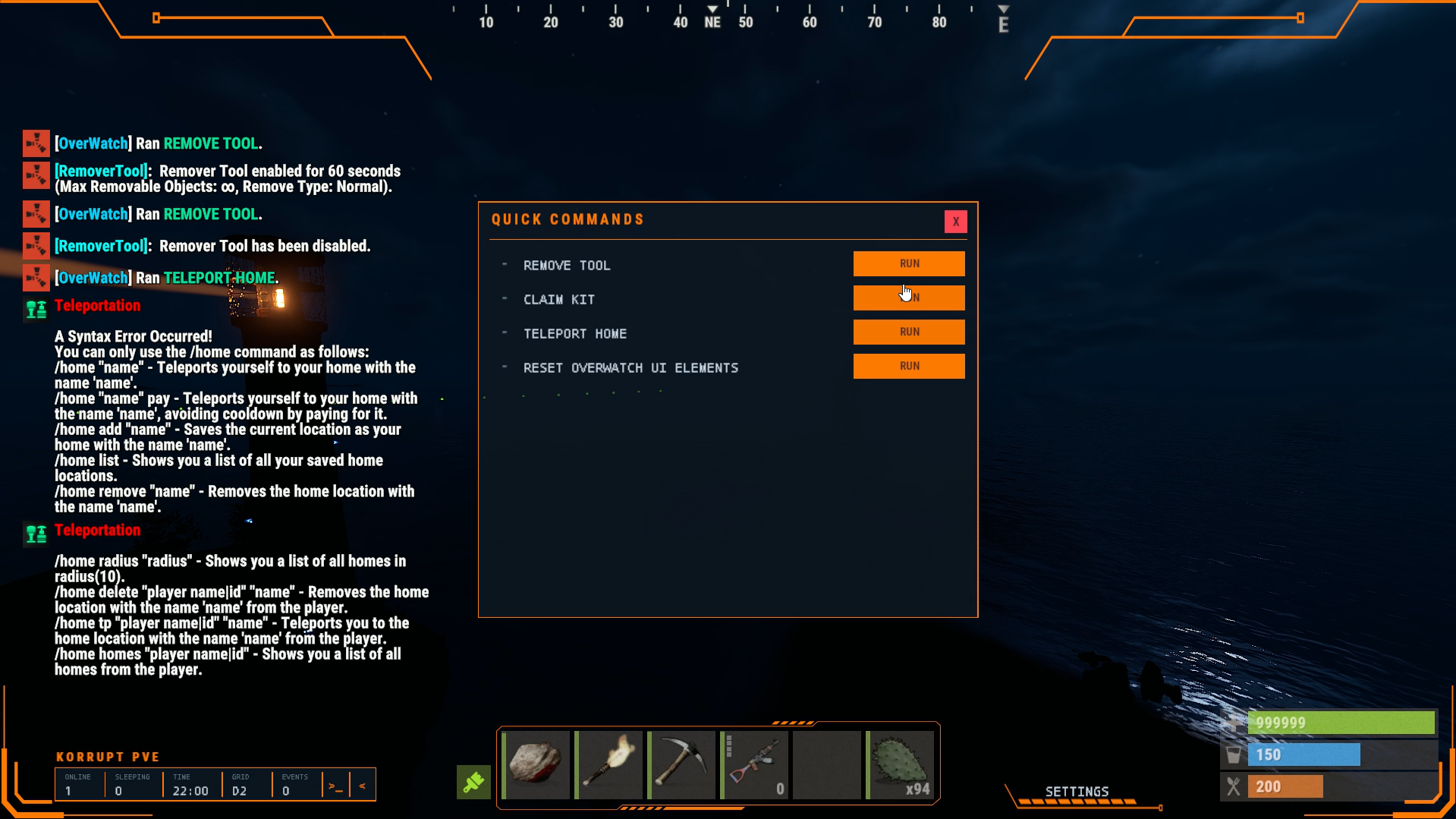
The most flexible HUD on the market.
This HUD shows an event banner the moment something happens anywhere on the server (Events that are listened to are below, more can be added upon request).
Use as a skinned item or grant with a Permission that skips the item check.
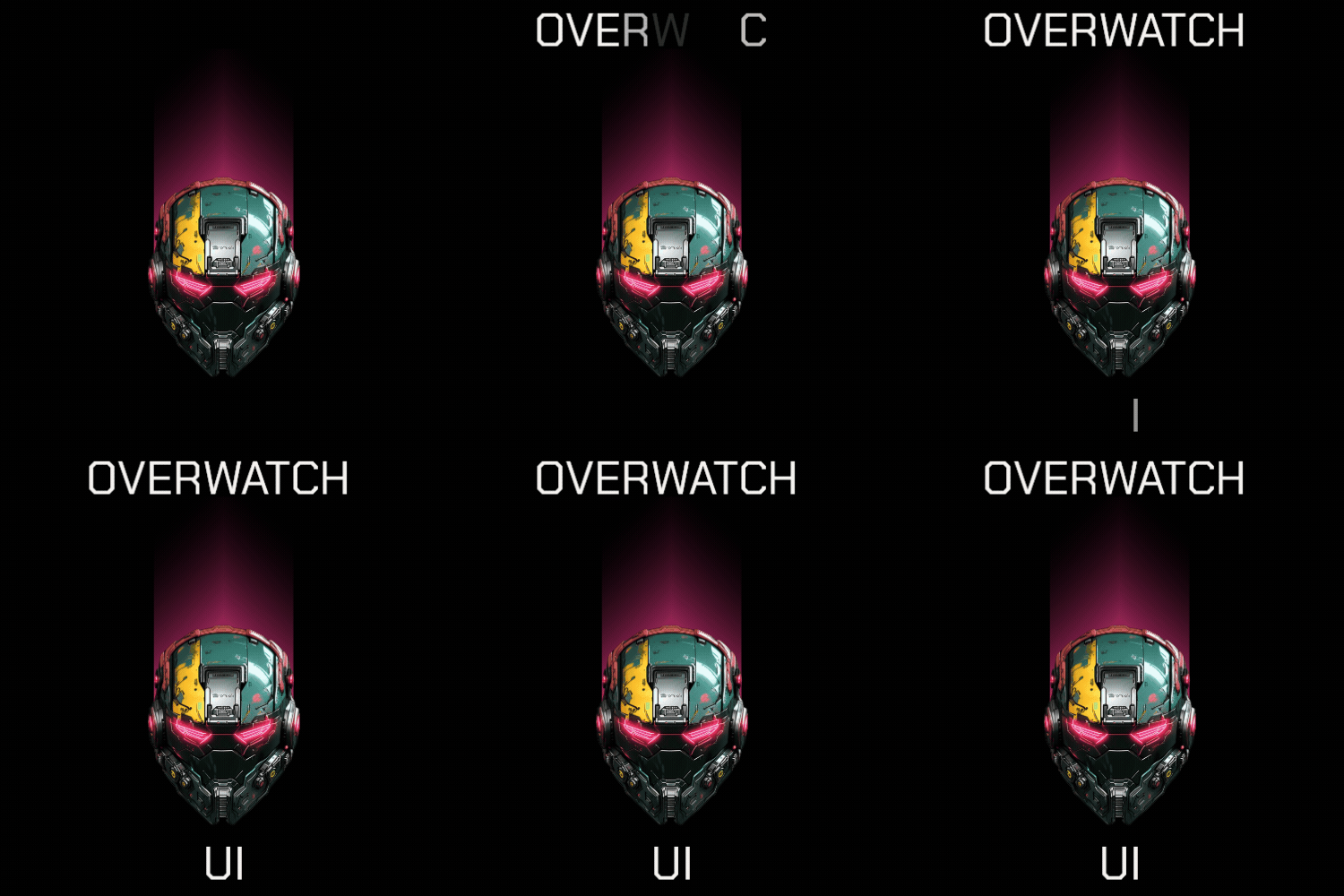
Putting the visor on plays a Boot Sequence - a segmented loading bar that fills in the player accent color before the HUD is pulled up.
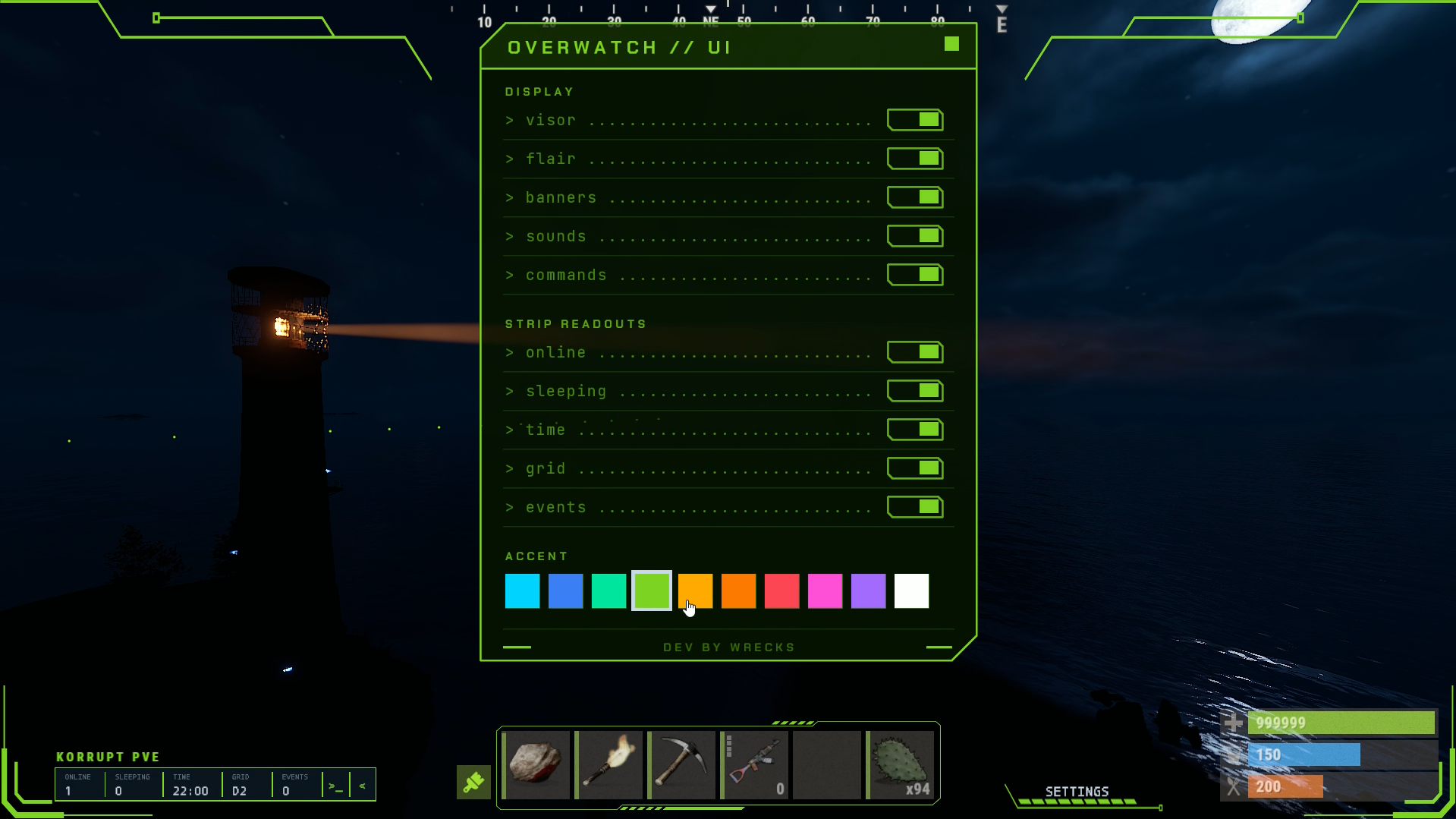
A persistent Status Strip shows players online, sleeping, in game time, your grid, how many events are running, and your balance and reward points, if your economy plugins are loaded.
Your Server Name sits just above the strip in the accent color. Leave it blank in config to disable.
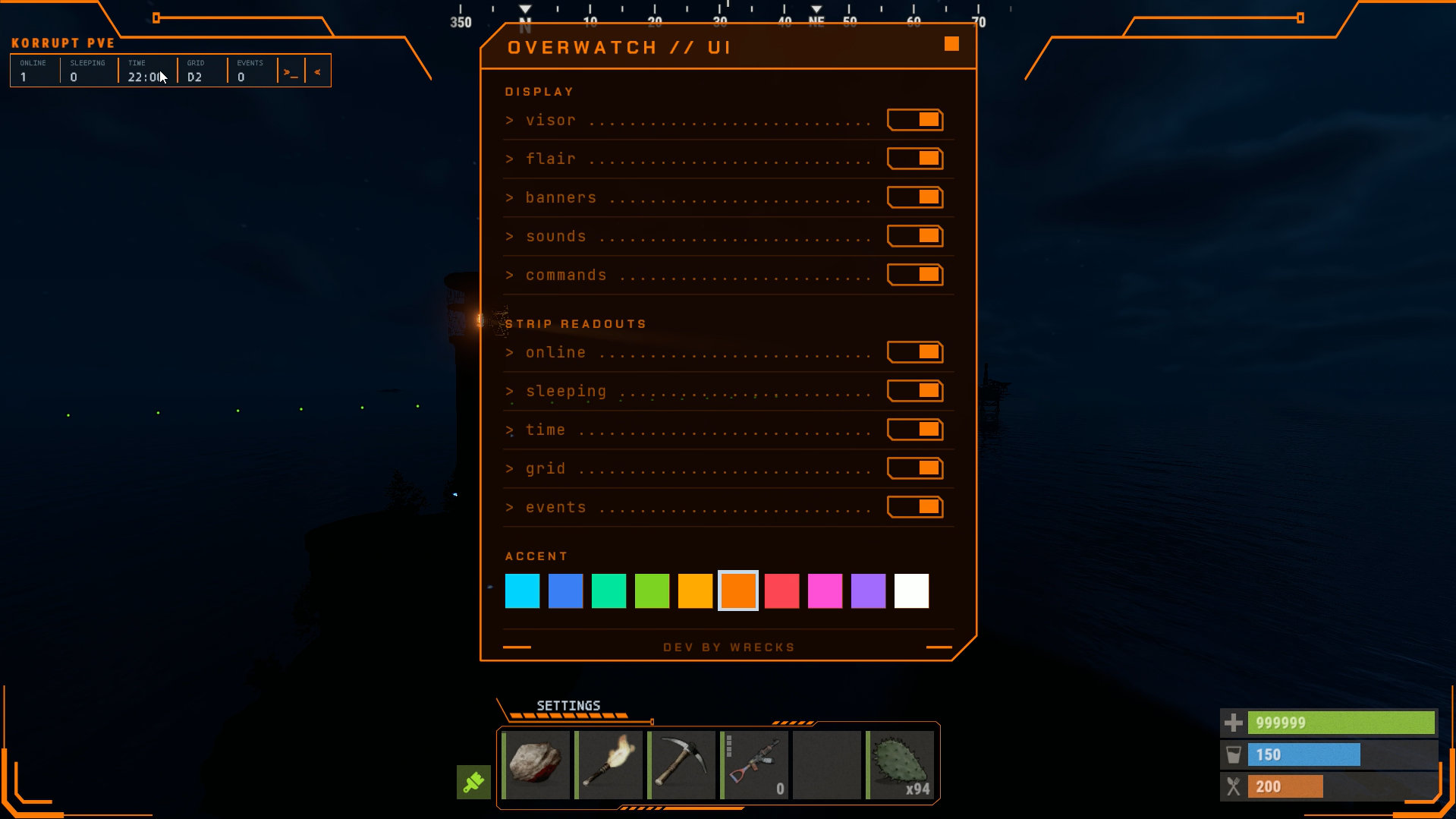
A caret on the end of the strip collapses it down to just that caret.
Open the settings panel and the strip and the settings bar become draggable. Pick either one up, drop it where you want it, and that spot is saved for that player alone. The strip keeps its left edge where you put it, so collapsing it pulls the right edge in rather than shifting the whole readout. Dragging is only live while the panel is open, so nothing is grabbable during normal play, and /overwatchreset puts both back.
The SETTINGS button opens a preferences panel. Each player turns the visor, flair, banners, sounds and the command runner on or off, picks which of the seven strip readouts they want, and chooses an accent color from the swatch row. Everything saves per player.
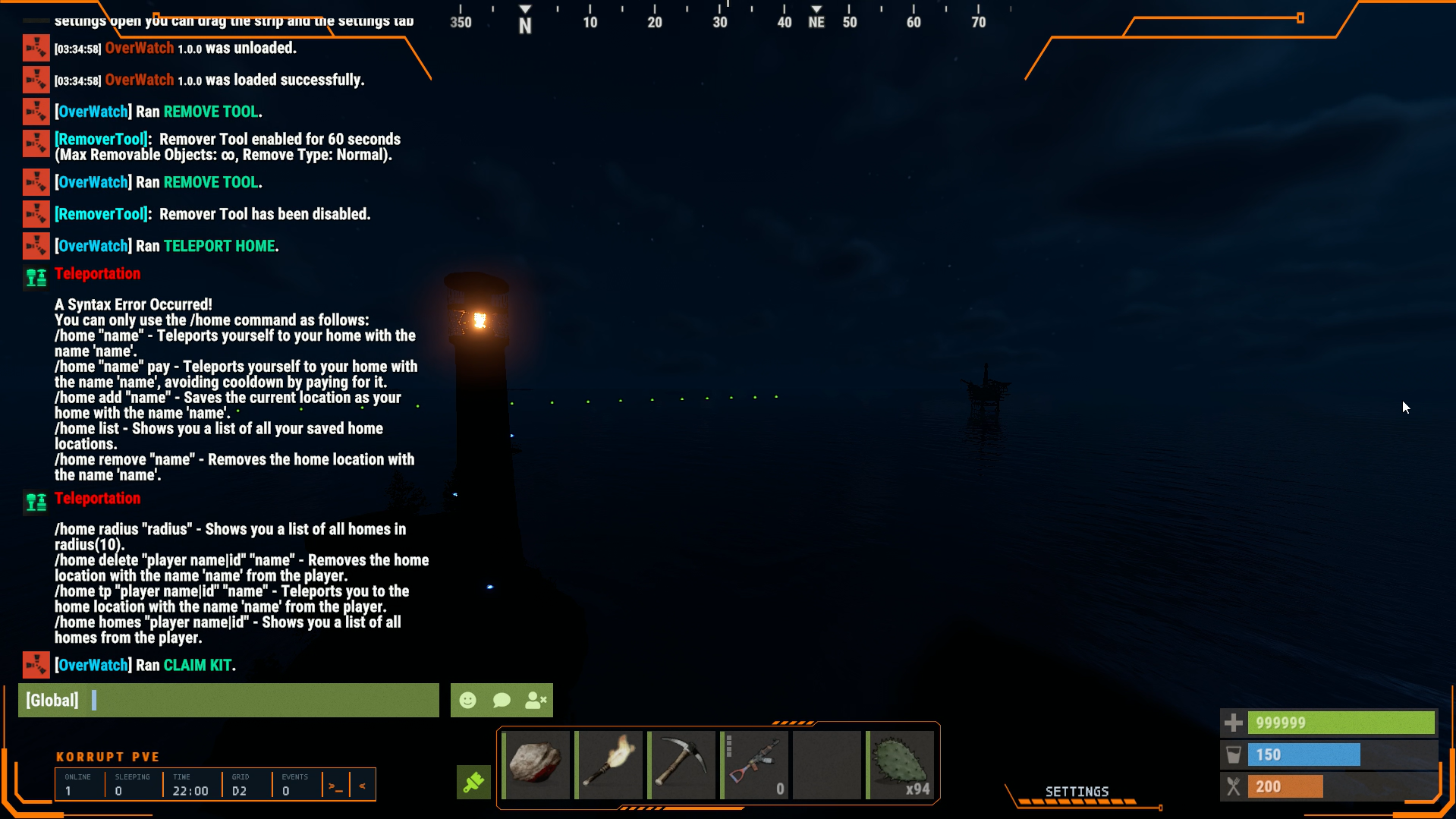
A Quick Command runner sits on the strip next to the caret. Admins define the list in config, each with an optional permission, and players click RUN to fire one. Run As Player decides whether it executes server side or is sent to that player's own client, which is what chat.say style commands need. The list pages eight at a time, and a player can star anything they use often to float it to the top. Commands support {id} and {name}.
The swatch row is driven by Accent colors in config - plain hex, six or eight digits, up to ten of them across one row. Accent tints chrome only - the flair art, the strip frame, the caret and panel headers.
Events arrive as a Banner across the top - a severity colored border, a glyph, a title and a subtitle.
Four severities, each with its own color - info, success, warning, alert.
The EVENTS cell counts what is currently running. Click it, or run the command, for a panel listing every active event with how long it has been going. It pages six at a time and the clocks tick live while you watch.
Event popups are setup to work with TakeOver, The Offering, Eradication, Bot Purge, Treasure Maps, Jackpot, Convoy, Guarded Crate, Space, Tornado, Escape Room and Dungeon Events to add more, message me.
Vanilla is covered with no extra plugins - Patrol Heli, Bradley, Chinook, Airdrop, Cargo Ship, Locked Crates, Santa, Egg Hunt and Halloween Hunt.
Commands
/overwatch - Toggles your own visor on and off. The choice persists.
/overwatchevents - Opens the active events panel. Toggles.
/overwatchcommands - Opens the quick command runner. Toggles.
/overwatchsettings - Opens the preferences panel. Toggles.
/overwatchreset - Puts the strip and the settings bar back to their default positions.
/overwatchtest - Requires Admin Permission - Previews a banner. Pass an event key to force one.
Usage: owpopup <all|steamid|name> <info|success|warning|alert> "title" "desc" [hold] [fadeIn] [fadeOut]
Only hold, fadeIn and fadeOut are optional, and each falls back to the plugin default. Popups only reach players with the visor open, and the count comes back in the reply.
Permissions
OverWatch.Use - Required to see the HUD at all.
OverWatch.NoMask - Skips the helmet requirement.
OverWatch.Admin - Required for admin commands.
Any permission named on a Quick Command is registered on load, so you can grant it without creating it yourself.
Dependencies
ImageLibrary - Required for the flair art and the panel plates. Without it the plugin still runs and falls back to drawn panels with no flair.
Economics - Optional. The BALANCE readout only appears when it is loaded.
ServerRewards - Optional. The RP readout only appears when it is loaded.
API
| 1 | OverWatch?.Call("ShowBanner", player, "TITLE", "subtitle", "alert", 4f); |
| 2 | OverWatch?.Call("BroadcastBanner", "TITLE", "subtitle", "warning", 4f); |
Severity is one of info, success, warning, alert, primary.
Event keys
Every event has a key. Reword it in Lang with key.title and key.sub, silence it by adding the key to Disabled Events, or preview it with /overwatchtest.
takeover.start, takeover.end, offering.active, offering.inactive, offering.rush, erad.start, erad.end, erad.win, purge.start, purge.end, purge.win, treasure.found, jackpot, convoy.start, convoy.end, crate.start, crate.end, space.start, space.end, tornado.start, tornado.end, escape.start, escape.end, dungeon.spawn, heli.spawn, bradley.spawn, ch47.spawn, airdrop.spawn, cargo.start, cargo.end, santa.start, santa.end, easter.start, easter.end, halloween.start, halloween.end, generic
The counted vanilla trackers use their own keys - heli, bradley, ch47, airdrop and oilcrate. Their row label is key.world in Lang.
Config
| 1 | { |
| 2 | "Helmet Shortname": "hat.wolf", |
| 3 | "Helmet Skin ID": 3804832903, |
| 4 | "Require Helmet": true, |
| 5 | "Server Name": "MY SERVER", |
| 6 | "Disabled Events": [], |
| 7 | "Accent colors": [ |
| 8 | "#00d4ff", |
| 9 | "#3b7ff5", |
| 10 | "#00e5a0", |
| 11 | "#7ed321", |
| 12 | "#ffaa00", |
| 13 | "#ff7a00", |
| 14 | "#ff4455", |
| 15 | "#ff4fd8", |
| 16 | "#a26bff", |
| 17 | "#ffffff" |
| 18 | ], |
| 19 | "Settings Text color": "#ffffff", |
| 20 | "Quick Commands": [ |
| 21 | { |
| 22 | "Name": "REMOVE TOOL", |
| 23 | "Command": "chat.say /remove", |
| 24 | "Permission": "", |
| 25 | "Run As Player": true |
| 26 | }, |
| 27 | { |
| 28 | "Name": "CLAIM KIT", |
| 29 | "Command": "kit give {name} test", |
| 30 | "Permission": "", |
| 31 | "Run As Player": false |
| 32 | }, |
| 33 | { |
| 34 | "Name": "TELEPORT HOME", |
| 35 | "Command": "chat.say /home", |
| 36 | "Permission": "", |
| 37 | "Run As Player": true |
| 38 | } |
| 39 | ] |
| 40 | } |
Lang
| 1 | { |
| 2 | "NoPerms": "[<color=#00d4ff>OverWatch</color>] You do not have permission to run this <color=#ff4455>Command</color>!", |
| 3 | "Enabled": "[<color=#00d4ff>OverWatch</color>] Visor <color=#00e5a0>online</color>.", |
| 4 | "Disabled": "[<color=#00d4ff>OverWatch</color>] Visor <color=#5a7080>offline</color>. Type <color=#00d4ff>/overwatch</color> to bring it back.", |
| 5 | "NoHelmet": "[<color=#00d4ff>OverWatch</color>] Equip the <color=#00d4ff>OverWatch</color> visor to use this.", |
| 6 | "heli.world": "PATROL HELI", |
| 7 | "bradley.world": "BRADLEY APC", |
| 8 | "ch47.world": "CHINOOK", |
| 9 | "airdrop.world": "AIRDROP", |
| 10 | "oilcrate.world": "LOCKED CRATE", |
| 11 | "cargo.start.title": "CARGO SHIP INBOUND", |
| 12 | "cargo.start.sub": "OFFSHORE APPROACH", |
| 13 | "cargo.end.title": "CARGO SHIP DEPARTED", |
| 14 | "santa.start.title": "SANTA SLEIGH", |
| 15 | "santa.start.sub": "GIFTS INBOUND", |
| 16 | "santa.end.title": "SLEIGH GONE", |
| 17 | "easter.start.title": "EGG HUNT", |
| 18 | "easter.start.sub": "EGGS SCATTERED", |
| 19 | "easter.end.title": "EGG HUNT OVER", |
| 20 | "halloween.start.title": "HALLOWEEN HUNT", |
| 21 | "halloween.start.sub": "TRICK OR TREAT", |
| 22 | "halloween.end.title": "HUNT OVER", |
| 23 | "heli.spawn.title": "PATROL HELI INBOUND", |
| 24 | "heli.spawn.sub": "HOSTILE AIRSPACE", |
| 25 | "bradley.spawn.title": "BRADLEY ROLLING", |
| 26 | "bradley.spawn.sub": "ARMOUR ON THE GROUND", |
| 27 | "ch47.spawn.title": "CHINOOK INBOUND", |
| 28 | "ch47.spawn.sub": "CRATE DROP RUN", |
| 29 | "airdrop.spawn.title": "AIRDROP INBOUND", |
| 30 | "airdrop.spawn.sub": "SUPPLY PLANE OVERHEAD", |
| 31 | "LayoutReset": "[<color=#00d4ff>OverWatch</color>] Layout reset to <color=#00d4ff>default</color>. Open settings and drag the strip or bar to reposition.", |
| 32 | "NoEvent": "[<color=#00d4ff>OverWatch</color>] No event keyed <color=#ffaa00>{0}</color>.", |
| 33 | "CommandRun": "[<color=#00d4ff>OverWatch</color>] Ran <color=#00e5a0>{0}</color>.", |
| 34 | "PopupUsage": "[<color=#00d4ff>OverWatch</color>] owpopup <all|steamid|name> <info|success|warning|alert> \"title\" \"desc\" [hold] [fadeIn] [fadeOut]", |
| 35 | "PopupSent": "[<color=#00d4ff>OverWatch</color>] Popup sent to <color=#00e5a0>{0}</color> players.", |
| 36 | "PopupOne": "[<color=#00d4ff>OverWatch</color>] Popup sent to <color=#00e5a0>{0}</color>.", |
| 37 | "PopupClosed": "[<color=#00d4ff>OverWatch</color>] <color=#ffaa00>{0}</color> does not have the visor open.", |
| 38 | "PopupNoTarget": "[<color=#00d4ff>OverWatch</color>] No player matching <color=#ffaa00>{0}</color>.", |
| 39 | "takeover.start.title": "TAKEOVER LIVE", |
| 40 | "takeover.start.sub": "{1}", |
| 41 | "takeover.end.title": "TAKEOVER ENDED", |
| 42 | "takeover.end.sub": "{0}", |
| 43 | "offering.active.title": "OFFERING ACTIVE", |
| 44 | "offering.active.sub": "SATISFY THE OFFERING", |
| 45 | "offering.inactive.title": "OFFERING CLOSED", |
| 46 | "offering.rush.title": "RUSH MODE", |
| 47 | "offering.rush.sub": "OFFERING WINDOW OPEN", |
| 48 | "erad.start.title": "ERADICATION EVENT", |
| 49 | "erad.start.sub": "WILDLIFE CULL UNDERWAY", |
| 50 | "erad.end.title": "ERADICATION OVER", |
| 51 | "erad.win.title": "ERADICATION WINNER", |
| 52 | "erad.win.sub": "{0}", |
| 53 | "purge.start.title": "BOT PURGE", |
| 54 | "purge.start.sub": "HOSTILES INBOUND", |
| 55 | "purge.end.title": "PURGE ENDED", |
| 56 | "purge.win.title": "PURGE WINNER", |
| 57 | "purge.win.sub": "{0}", |
| 58 | "treasure.found.title": "TREASURE FOUND", |
| 59 | "treasure.found.sub": "{0} - {1}", |
| 60 | "jackpot.title": "JACKPOT WINNER", |
| 61 | "jackpot.sub": "{0}", |
| 62 | "convoy.start.title": "CONVOY INBOUND", |
| 63 | "convoy.start.sub": "ARMED ESCORT ON THE ROAD", |
| 64 | "convoy.end.title": "CONVOY GONE", |
| 65 | "crate.start.title": "GUARDED CRATE", |
| 66 | "crate.start.sub": "{0}", |
| 67 | "crate.end.title": "CRATE SECURED", |
| 68 | "crate.end.sub": "{0}", |
| 69 | "space.start.title": "SPACE EVENT", |
| 70 | "space.start.sub": "ORBIT IS OPEN", |
| 71 | "space.end.title": "SPACE EVENT OVER", |
| 72 | "tornado.start.title": "TORNADO ACTIVE", |
| 73 | "tornado.end.title": "TORNADO CLEARED", |
| 74 | "escape.start.title": "ESCAPE ROOM", |
| 75 | "escape.start.sub": "DOORS ARE OPEN", |
| 76 | "escape.end.title": "ESCAPE ROOM CLOSED", |
| 77 | "dungeon.spawn.title": "DUNGEON OPENED", |
| 78 | "dungeon.spawn.sub": "{3} - {2}", |
| 79 | "generic.title": "{0}", |
| 80 | "generic.sub": "{1}" |
| 81 | } |
OverWatch.json
{
  "Helmet Shortname": "hat.wolf",
  "Helmet Skin ID": 3804832903,
  "Require Helmet": true,
  "Server Name": "MY SERVER",
  "Disabled Events": [],
  "Accent Color": [
    "#00d4ff",
    "#3b7ff5",
    "#00e5a0",
    "#7ed321",
    "#ffaa00",
    "#ff7a00",
    "#ff4455",
    "#ff4fd8",
    "#a26bff",
    "#ffffff"
  ],
  "Settings Text Color": "#ffffff",
  "Quick Commands": [
    {
      "Name": "REMOVE TOOL",
      "Command": "chat.say /remove",
      "Permission": "",
      "Run As Player": true
    },
    {
      "Name": "CLAIM KIT",
      "Command": "kit give {name} test",
      "Permission": "",
      "Run As Player": false
    },
    {
      "Name": "TELEPORT HOME",
      "Command": "chat.say /home",
      "Permission": "",
      "Run As Player": true
    }
  ]
}

Trusted hosting partner. Affordable game servers with solid support and panels.
Visit site ↗