Account Linker
 Mr.Kingpin
 1 / 4
1 / 4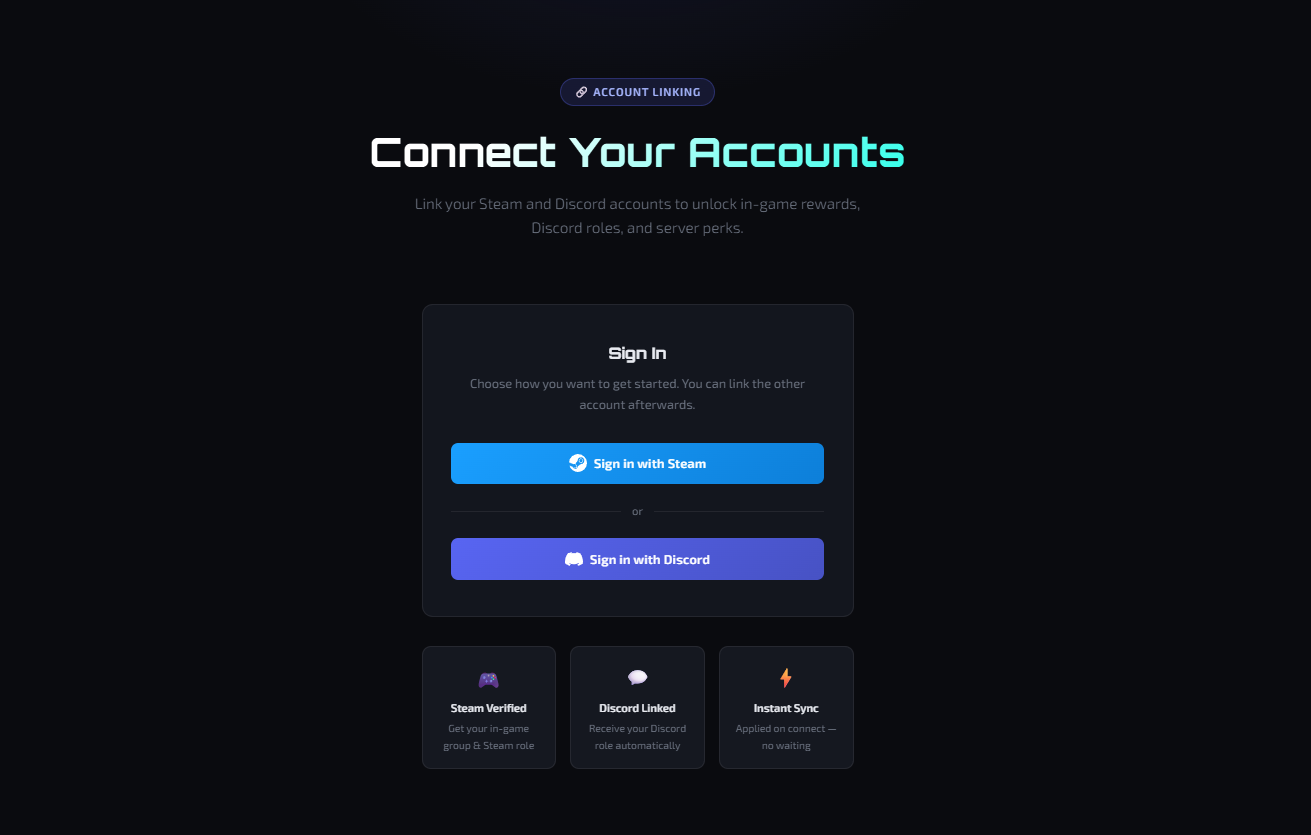
AccountLinker - Discord & Steam Account Linking for Rust
AccountLinker is a Rust server plugin that lets players link their Discord and/or Steam account to receive in-game groups and Discord roles automatically. Works on both Oxide/uMod and Carbon.
Full setup instructions are included in SETUP.md. For custom website integrations, see WEBSITE_SYNC_API.md.
How It Works
Players can link their accounts in two ways:
1. In-game via /link
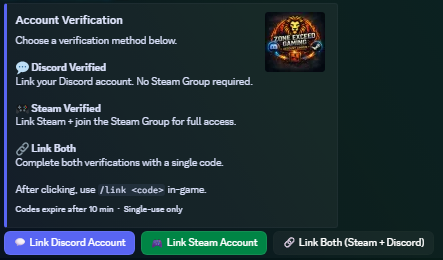
- Click a button in your Discord verify channel
- A unique one-time code is sent via Discord DM
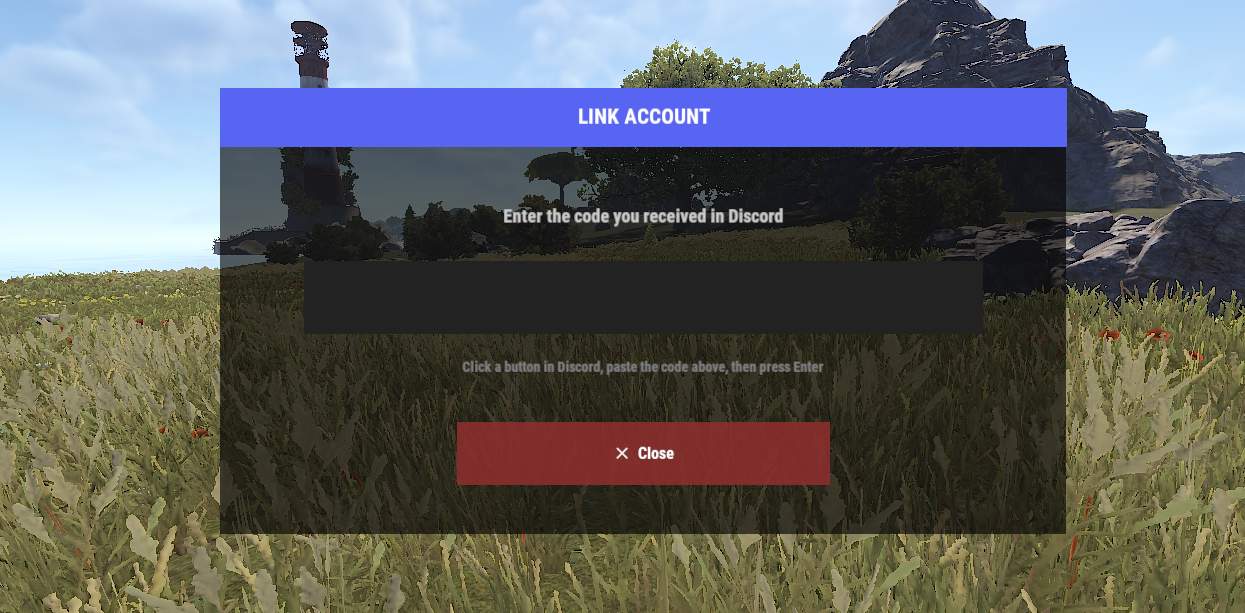
- Type
/link <code>in-game - Groups and roles are assigned instantly
2. Via the optional WebSync website
- Players visit the website and log in with Steam or Discord
- Link the other account from the dashboard
- The plugin syncs automatically on the next server join
Verification Tiers
Discord Verified
- Links the player's Discord account
- Grants a configurable Oxide/Carbon group
- Grants a configurable Discord role
- Does not require Steam Group membership
Steam Verified
- Links the player's Steam account
- Requires membership in a specified Steam Group
- Grants a configurable Oxide/Carbon group
- Grants a configurable Discord role
Both
- A single button and code that handles both tiers at once
- Player receives all groups and roles in one step
Discord Features
- Verify embed with buttons posted automatically in a channel
- Old embed deleted and reposted cleanly on every restart or reload
- Button interactions: Discord, Steam, or Both
- One-time codes sent via Discord DM with configurable expiry
- Rate limiting and lockout after too many failed attempts
- Log channel with rich embeds for every link and unlink event
In-Game Commands
Player commands
/link <code>- Link your account using a code from Discord/unlink- Remove your account link/linkstatus- Check your current link status/linkerhelp- Show the help message
Admin commands (requires accountlinker.admin permission)
/linkeradmin postverify- Force re-post the verify embed/linkeradmin unlink <steamid>- Unlink a player by Steam ID/linkeradmin info <steamid>- View link info for a player/linkeradmin list- List all linked players/linkeradmin stats- Show total linked players and tier breakdown
WebSync Website (Optional)
Includes a ready-to-deploy PHP website that lets players link accounts through a browser.
Features
- Sign in with Steam or Discord - both flows supported
- Link the other account from the dashboard
- Fully styled dark UI
- Automatic sync when the player connects to the server
- Periodic background sync with configurable interval
- Revokes groups and roles when an account is disconnected on the website
Requirements
- PHP 7.4+ with
pdo,pdo_sqlite,curl - A Discord application with OAuth2 configured
- A Steam API key
Requirements
- Oxide/uMod or Carbon
- uMod Discord Extension - https://umod.org/extensions/discord
- A Discord bot token
- A Discord server
- (Optional) Steam API key - required for Steam Group verification
- (Optional) PHP web server - required for WebSync
Installation
See SETUP.md for the full step-by-step setup guide.
Quick start
- Copy
AccountLinker.csto your plugins folder - Install the uMod Discord Extension
- Start the server - a default config is generated automatically
- Fill in
AccountLinker.jsonwith your bot token, guild ID, and channel IDs - Reload:
oxide.reload AccountLinkerorc.reload AccountLinker - The verify embed appears in your Discord channel automatically
WebSync quick start
- Upload the
WebSync/folder to your web server - Open
setup.phpin a browser and follow the wizard - Enable Website Sync in
AccountLinker.jsonand set the API URL and secret - Delete
setup.phpfrom your server when done
Compatible with: Oxide/uMod, Carbon
For further support you may contact me directly mr.kingpin
AccountLinker.json
{
  "Bot Token": "",
  "Discord Guild ID": 0,
  "Verify Channel ID": 0,
  "Log Channel ID": 0,
  "Embed Thumbnail URL (small image top-right, leave empty to disable)": "",
  "Embed Color (hex)": "#5865F2",
  "Discord Verified": {
    "Carbon Group": "discord_verified",
    "Discord Role ID": 0,
    "Button Label": "💬  Link Discord Account",
    "Button Enabled": true
  },
  "Steam Verified": {
    "Carbon Group": "steam_verified",
    "Discord Role ID": 0,
    "Button Label": "🎮  Link Steam Account",
    "Button Enabled": true
  },
  "Both Button": {
    "Button Label": "🔗  Link Both (Steam + Discord)",
    "Button Enabled": true
  },
  "Steam API Key": "",
  "Steam Group GID (64-bit)": "YOUR_STEAM_GROUP_GID",
  "Code Length (6-10)": 8,
  "Code Expires After (minutes)": 10,
  "Rate Limit (seconds between code requests)": 60,
  "Max Failed Attempts Before Lockout": 5,
  "Enable CUI Link Screen": true,
  "Inactivity Unlink (days, 0 = disabled)": 30,
  "Inactivity Check Interval (hours)": 24.0,
  "Website Sync": {
    "Enabled": false,
    "ApiUrl": "https://yoursite.com/websync/api/linker.php",
    "ApiSecret": "",
    "SyncOnConnect": true,
    "PeriodicSyncMinutes": 5.0
  }
}

Trusted hosting partner. Affordable game servers with solid support and panels.
Visit site ↗