Loading...
Sam Site Limiter
 scalbox
SamSiteLimiter allows you to change the SAM site turret limit for the individual player or for the entire CLAN/TEAM, based on the configurations and assigned roles. You can limit the number of SAM site turrets per TC (Tool Cupboard) or by range.
You can configure the plugin to disable all server and/or player SAM site turrets with the ability to bypass these limitations via roles and/or configurations. It also offers commands to view SAM site turret statistics and the ability to turn SAM site turrets on and off via commands.
Basically, 4 groups are configured: Default, VIP1, VIP2, VIP3, in this way you can decide the limit of the SAM site turrets based on the TC (Tool Cupboard) or the radius, based on the group assigned to the player or CLAN/TEAM.
Permissions:
- samsitelimiter.admin -- Allows you to execute some commands reserved for administrators
- samsitelimiter.bypass.force -- Allows you to bypass limits forcibly, regardless of configuration
- samsitelimiter.default -- Assign configurations: Default
- samsitelimiter.vip1 -- Assign configurations: VIP1
- samsitelimiter.vip2 -- Assign configurations: VIP2
- samsitelimiter.vip3 -- Assign configurations: VIP3
COMMANDS
Commands can be typed in chat (by putting the / character in front of the command), or from console.
-
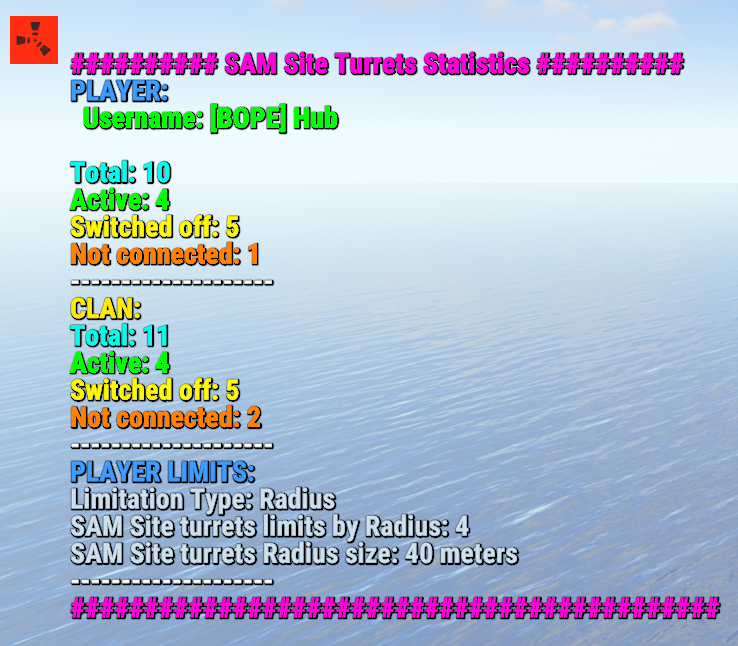
/ssl status or /ssl st-- This command allows the player to see his SAM site turret statistics and limits -
/ssl status <steamID> or /ssl st <steamID>-- This command allows the administrator to see another player's SAM site turret and limit statistics. To use this command you must have permission: samsitelimiter.admin -
/ssl start or /ssl stop-- This command allows the player to turn all of your SAM site turrets ON or OFF. To use this command, you must enable the AllowCommandsToStartAndStop = true property in your configuration or have permission: samsitelimiter.admin -
/ssl start <steamID> or /ssl stop <steamID>-- This command allows you to turn ON or OFF all SAM site turrets of a player based on its SteamID. To use this command you must have permission: samsitelimiter.admin-
NB: The commands
start or stopturns all player SAM site turrets ON or OFF. If the player is part of a clan/team, all SAM site turrets of all members of the clan/team will be turned ON or OFF.
-
NB: The commands
Commands can be added or modified in the configuration file: /oxide/config/SamSiteLimiter.json Command output example (/ssl status or /ssl st)
CLAN/TEAM
If you are part of a clan/team and there are 1 more members who have the VIP/ROLE, then all members of the clan/team will benefit.
Example: a clan/team member has the VIP/ROLE to be able to place 5 SAM site turrets, in this case all clan/team members will be able to place 5 SAM site turrets, but this does not mean that the total number of turrets you can place are added, the limit in in this case there are still 5 SAM site turrets, but they can be positioned by all members of the clan/team, rather than just the player who has the VIP/ROLE (in this case we assumed that the VIP/ROLE limited to 5 SAM site turrets).
If there are multiple clan/team members who have different VIPs/ROLEs, the best VIP/ROLE will be taken, usually VIP3
You can enable this setting from the configuration file: "Share Group With Clan/Team members. Default FALSE": false": true
Configuration
The settings and options can be configured in the SamSiteLimiter under the config directory. The use of an editor and validator is recommended to avoid formatting issues and syntax errors.
{
  "Share Group With Clan/Team members. Default FALSE": false,
  "DisableAllServerSamSite (Disables all server SAM Site turrets). Default False.)": false,
  "DisableAllPlayerSamSite (Disables all player SAM Site turrets). Default False.)": false,
  "AllowAdminBypass (Allows admin to bypass SAM Site turret limitations). Default False.)": false,
  "PlayerShowSamSiteCountInfoMessage (Show the player, when he places a SAM site, a message with the number of turrets that are placed in the TC range or Radius he is in. Default true.)": true,
  "AllowCommandsToStartAndStop (If set to TRUE, enables commands to allow the player or clan/team to turn their all SAM site ON or OFF. Default FALSE)": false,
  "EnableMessageInfo (If set to TRUE, it shows a message info to the player, when he takes hold of an electricity cable or SAM Site, of the commands that the plugin makes available to him)": true,
  "Chat Command": [
    "ssl",
    "samsitelimiter"
  ],
  "RolePermission": {
    "default": {
      "Type of limitation, TC-based or Radius-based. Value [Tc | Radius] (Default RADIUS)": "Tc",
      "SAM Site limit for TC-based limitation": 2,
      "SAM Site limit for Radius-based limitation": 0,
      "Radius (meters) within which the system checks for other SAM Site (lower = more SAM sites in the same area) (Default 40)": 0
    },
    "vip1": {
      "Type of limitation, TC-based or Radius-based. Value [Tc | Radius] (Default RADIUS)": "Radius",
      "SAM Site limit for TC-based limitation": 0,
      "SAM Site limit for Radius-based limitation": 4,
      "Radius (meters) within which the system checks for other SAM Site (lower = more SAM sites in the same area) (Default 40)": 40
    },
    "vip2": {
      "Type of limitation, TC-based or Radius-based. Value [Tc | Radius] (Default RADIUS)": "Radius",
      "SAM Site limit for TC-based limitation": 0,
      "SAM Site limit for Radius-based limitation": 8,
      "Radius (meters) within which the system checks for other SAM Site (lower = more SAM sites in the same area) (Default 40)": 40
    },
    "vip3": {
      "Type of limitation, TC-based or Radius-based. Value [Tc | Radius] (Default RADIUS)": "Radius",
      "SAM Site limit for TC-based limitation": 0,
      "SAM Site limit for Radius-based limitation": 10,
      "Radius (meters) within which the system checks for other SAM Site (lower = more SAM sites in the same area) (Default 40)": 20
    }
  },
  "VersionNumber": {
    "Major": 1,
    "Minor": 0,
    "Patch": 0
  }
}
- Share Group With Clan/Team members: If set to TRUE, the group assigned to a player is shared with all members of the clan/team. The group with the lowest priority is shared, then all members of the clan/team will benefit. Default FALSE
- DisableAllServerSamSite (Disables all server SAM Site turrets). Default False.): Disables all server SAM site turrets but not player SAM turrets. Default: FALSE
- DisableAllPlayerSamSite (Disables all player SAM Site turrets). Default False.): Disables all player SAM site turrets. Default: FALSE
- AllowAdminBypass (Allows admin to bypass SAM Site turret limitations). Default False.): If enabled you can bypass the SAM site turret limit with the role: samsitelimiter.admin. However, if you have the samsitelimiter.bypass.force role, you can forcibly bypass the SAM site turret limit, regardless of this configuration. Default: FALSE
- PlayerShowSamSiteCountInfoMessage (Show the player, when he places a SAM site, a message with the number of turrets that are placed in the TC range or Radius he is in. Default true.): Show the player, when he places a SAM site turret, a message with the number of SAM site turrets that are placed. Default: TRUE.
- AllowCommandsToStartAndStop (If set to TRUE, enables commands to allow the player or clan/team to turn their all SAM site ON or OFF. Default FALSE): If set to TRUE, enables commands to allow the player or clan/team to turn their all SAM site turrets ON or OFF. Default FALSE.
- EnableMessageInfo (If set to TRUE, it shows a message info to the player, when he takes hold of an electricity cable or SAM Site, of the commands that the plugin makes available to him): If set to TRUE, it shows a message info to the player, when he takes hold of an electricity cable or SAM site turret, of the commands that the plugin makes available to him. Default: TRUE.
- Chat Command: Here you can add, edit or delete Commands can be typed in chat (by putting the / character in front of the command), or from console.
-
RolePermission
- Type of limitation, TC-based or Radius-based. Value [Tc | Radius] (Default RADIUS): Specify the type of limitation: enable limitation based on TC (Tool Cupboard) or Radius.
- SAM Site limit for TC-based limitation: If TC (Tool Cupboard) limit is enabled, specifies how many SAM site turrets can be placed around that TC (the entire building covered by the TC).
- SAM Site limit for Radius-based limitation: If Radius Limiting is enabled, specifies how many SAM site turrets can be placed in that specific Radius.
-
Radius (meters) within which the system checks for other SAM Site (lower = more SAM sites in the same area) (Default 40): Set the radius size in meters.
PlayerShowSamSiteCountInfoMessage EXAMPLE: 

EnableMessageInfo EXAMPLE:

Localization
The plugin, therefore the automatic messages and statistics, are translated into the following languages:
- English
- Italian
- Spanish
- French
- German
- Dutch
- Turkish
- Russian
- Ukrainian
Translation files are located in the /oxide/lang folder, here is an example of a /oxide/lang/en/SamSiteLimiter.json translation file. You can add translations for other languages by adding them to the folder: /oxide/lang